How to Connect Trading Logic to Automated Software in MT4 or MQL5 (Complete Beginner Guide)
Step-by-step guide to convert your manual trading ideas into a working MT4 trading bot (Expert Advisor). Includes planning your strategy, writing MQL4 code, testing with backtesting, running on demo/live accounts, and free setup assistance from SolveSphere.
Overview — turning an idea into a trading bot
If you have a profitable trading idea — a price action rule, an indicator combination, or a money management scheme — you can convert it into an automated trading system (a trading bot) for MetaTrader 4. This process requires: planning the trading logic, translating it into MQL4 code, verifying with backtesting software, and running live/demo tests.
This guide focuses on MT4 (MQL4) because it’s widely supported by brokers and ideal for forex-focused beginners. We’ll also point out where MT5 (MQL5) differs. If you want help at any step, we offer free automation setup assistance — send your strategy to contact@solvesphere.co.in and our team will help you get started.
Step 1 — Define clear trading logic (strategy specification)
Before any code, write your strategy in plain English. This is the single most important step. A clear specification prevents ambiguity when programming and testing.
Checklist for a good strategy specification
- Entry conditions: exact indicator values, candle patterns, or price levels that trigger a trade.
- Exit conditions: stop loss (SL), take profit (TP), time-based exit, or indicator exit rules.
- Position sizing: fixed lots or percent-of-equity risk management.
- Trading hours / filters: trade only during session times or avoid news.
- Order management: one trade at a time, pyramiding, or scaling.
Example: “Buy when 50 SMA crosses above 200 SMA on H1, set SL = 100 pips, TP = 200 pips, fixed lot 0.1. Close when opposite cross occurs.” This clarity makes coding straightforward.
Step 2 — Create a flowchart or pseudo-code
Convert the specification into pseudo-code. This helps both developers and non-coders understand logic flow. Example pseudo-code:
IF (FastMA > SlowMA) AND (No open buy orders)
  THEN OpenBuy(lots, SL, TP)
IF (FastMA < SlowMA) AND (No open sell orders)
  THEN OpenSell(lots, SL, TP)
IF (OpenBuy AND TrailingStart reached)
  THEN Move_SL_up()
Writing pseudo-code reduces rework when implementing MQL4 and speeds up development — it’s a core part of professional software development for trading.
Step 3 — Translate logic into MQL4 (example & tips)
If you or your developer knows MQL4, implement the pseudo-code directly in MetaEditor. Below is a compact example of how a Moving Average crossover logic maps into MQL4 code — use it as a starting point and expand with risk controls.
// Simple MA Crossover (structure)
int OnInit() { return(INIT_SUCCEEDED); }
void OnTick()
{
  double fast = iMA(NULL,0,FastMA,0,MODE_SMA,PRICE_CLOSE,0);
  double slow = iMA(NULL,0,SlowMA,0,MODE_SMA,PRICE_CLOSE,0);
  // entry/exit logic...
}
Tips for translating logic:
- Use built-in MQL4 indicator functions (iMA, iRSI, iMACD) to avoid reimplementing calculations.
- Use OrderSend, OrderClose, OrderModify safely (check return values and GetLastError()).
- Implement logging (Print or file logs) to debug strategies during testing and live runs.
- Keep code modular: separate entry, exit, money-management, and utility functions.
Step 4 — Prepare data & backtesting environment
Quality of historical data matters. If your backtest uses low-quality data, the results will be misleading. For accurate results:
- Use 99% tick data when available (Tick Data Suite or similar).
- Set the Strategy Tester to “Every tick” model for precise simulation.
- Include realistic spreads, commissions, and swap rates in test settings.
- Test multiple symbols and timeframes to avoid overfitting.
We offer a backtesting service where we prepare data and run optimizations using professional tools — contact us if you’d rather skip the setup and get reliable results fast.
Step 5 — Backtest your EA: run, analyze, iterate
Run the EA in MT4 Strategy Tester and carefully examine metrics:
- Net profit, profit factor, max drawdown, number of trades.
- Check the equity curve for stability — smooth upward curves are better than jagged ones.
- Investigate losing trades manually: were they caused by slippage, spread spikes, or logic flaws?
If performance is poor, iterate: tweak parameters, add filters (volatility, time-of-day), or refine position sizing. Avoid “curve-fitting” — an over-optimized system that looks great on historical data but fails live.
Step 6 — Forward testing (demo/live)
After successful backtesting, use forward testing on a demo account. Forward testing shows how the EA performs in real-time conditions: variable spreads, slippage, and broker execution quirks.
Free setup assistance: As promised, SolveSphere offers free help to set up your EA on a demo account. Email your EA code or .mq4 file and we’ll guide you through installation, settings, and initial live demo checks.
Step 7 — Risk controls and production readiness
Before going live, ensure your EA includes:
- Stop loss and take profit on every trade.
- Maximum drawdown stop (pause trading if equity drops X%).
- Daily trade limits and time filters (avoid news/high volatility).
- Fail-safes: reconnect logic, re-try order submission on failure, and logging for errors.
Step 8 — Deploy on VPS for 24/7 uptime
For reliable live trading, use a low-latency VPS near your broker’s servers. This minimizes execution delays and reduces chance of missed orders. SolveSphere can recommend VPS providers and help configure your MT4 instance for production.
Step 9 — Monitor & maintain
Automation requires monitoring. Even a well-tested trading bot can behave differently after market structure changes. Monitoring steps:
- Daily check of open positions and logs.
- Monthly performance review and parameter revalidation.
- Keep a change-log when you alter code or parameters.
Backtesting strategies — practical advice
Use these strategies to make backtests more reliable:
- Walk-forward testing: Optimize on one period, test on the next — repeat across many segments.
- Monte Carlo simulations: Randomize trade order or slippage to test robustness.
- Stress testing: Test during high-volatility periods (news, spikes) to see how the algorithm behaves.
Common pitfalls and how to avoid them
- Overfitting: Keep models simple and prefer stable results over peak returns.
- Data-snooping bias: Avoid using future information in past tests.
- Ignoring execution: Simulated fills assume ideal execution — real markets don’t.
How SolveSphere helps — services & free setup
We help traders at every step: converting strategy to MQL4 code, running professional backtests, optimizing parameters, and deploying on VPS. Services we offer:
- Custom EA Development: We build trading bots from any logic — indicators, price-action, multi-timeframe rules.
- Backtesting & Optimization: High-quality data, walk-forward tests, Monte Carlo, and report generation.
- Deployment & Monitoring: VPS setup, EA installation, and monitoring scripts.
- Free Demo Setup Assistance: We help you install and run your EA on a demo account at no charge — email contact@solvesphere.co.in.
Example: connecting an RSI-based strategy into MT4
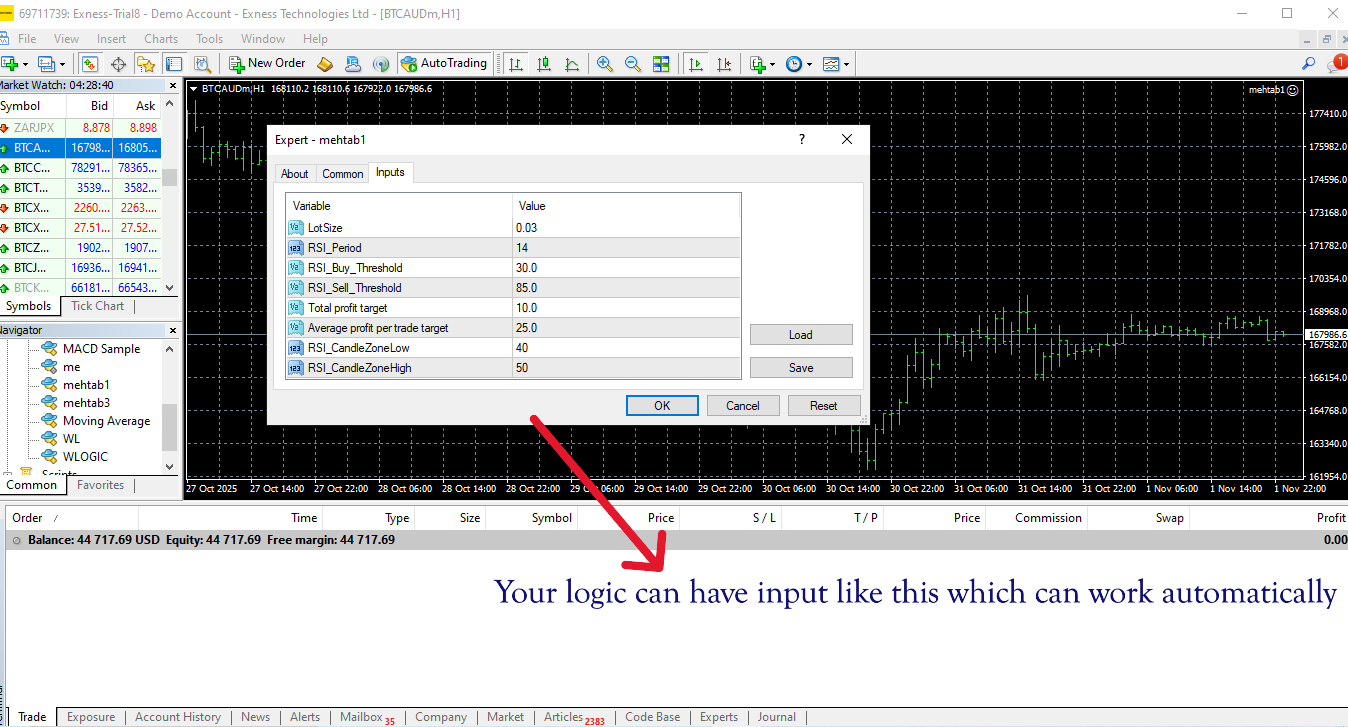
Short example flow: you have an RSI-based entry rule — RSI(14) crosses below 30 → buy. We translate this into MQL4 with iRSI() calls, add position sizing, SL/TP, and run backtests across multiple pairs. The end result: a working MT4 trading bot you can demo instantly.
// RSI example snippet
double rsi = iRSI(NULL,0,14,PRICE_CLOSE,0);
if(rsi < 30 && OrdersTotal()==0) { OrderSend(Symbol(),OP_BUY,LotSize,Ask,3,Ask-Stop*Point,Ask+TP*Point,"RSI_Buy",0,0,clrGreen); }
Checklist before going live (quick)
- ✅ Backtest 2+ years of quality data
- ✅ Forward test on demo for at least 1 month (or 100 trades)
- ✅ Add stop-loss / max-drawdown kill switch
- ✅ Run walk-forward tests and Monte Carlo
- ✅ Deploy on VPS and monitor initial live behavior
Frequently Asked Questions
Q: How long until I can trust a trading bot?
A: There’s no fixed time. Common practice: run demo forward testing for at least 1-3 months or 100–300 trades to collect statistically significant samples.
Q: Can SolveSphere convert my spreadsheet rules into an EA?
A: Yes. Send your rules, examples, and preferred risk settings to contact@solvesphere.co.in and we’ll reply with a plan. We convert logic from spreadsheets, indicator charts, or verbal descriptions.
Q: Do you support both MT4 and MT5?
A: Yes — our primary focus here is MT4 (MQL4) because it’s excellent for forex beginners. We also build MQL5 bots on request for users trading stocks, futures, or needing advanced features.
Conclusion — connect, test, and automate with confidence
Connecting trading logic to automated software is a repeatable process: define rules, write pseudo-code, implement in MQL4, backtest thoroughly, forward test on demo, and finally deploy with proper risk controls. Use reliable backtesting software and follow professional development practices to reduce surprises in live trading.
If you want hands-on help, take advantage of our free EA setup assistance. Email us at contact@solvesphere.co.in — send your strategy, sample trades, or EA code and our team will help you set it up and test it on MT4 demo.
Ready to convert your trading logic into a real trading bot? Start today — automate, test, and improve.